Rucking app · Weighted vest walking tracker

Carry the weight. Come back for more.

RuckWell is the rucking app that counts the weight on your back, then helps you balance hard days with easy days, mobility and rest. Free on iPhone, Apple Watch and Android.

Also on Google Play. Also on the App Store for iPhone.

QR code that opens RuckWell in the App Store or Google Play

Scan to get the app

4.5 on the App Store · 938 ratings · No account needed

App Store rating, November 2026

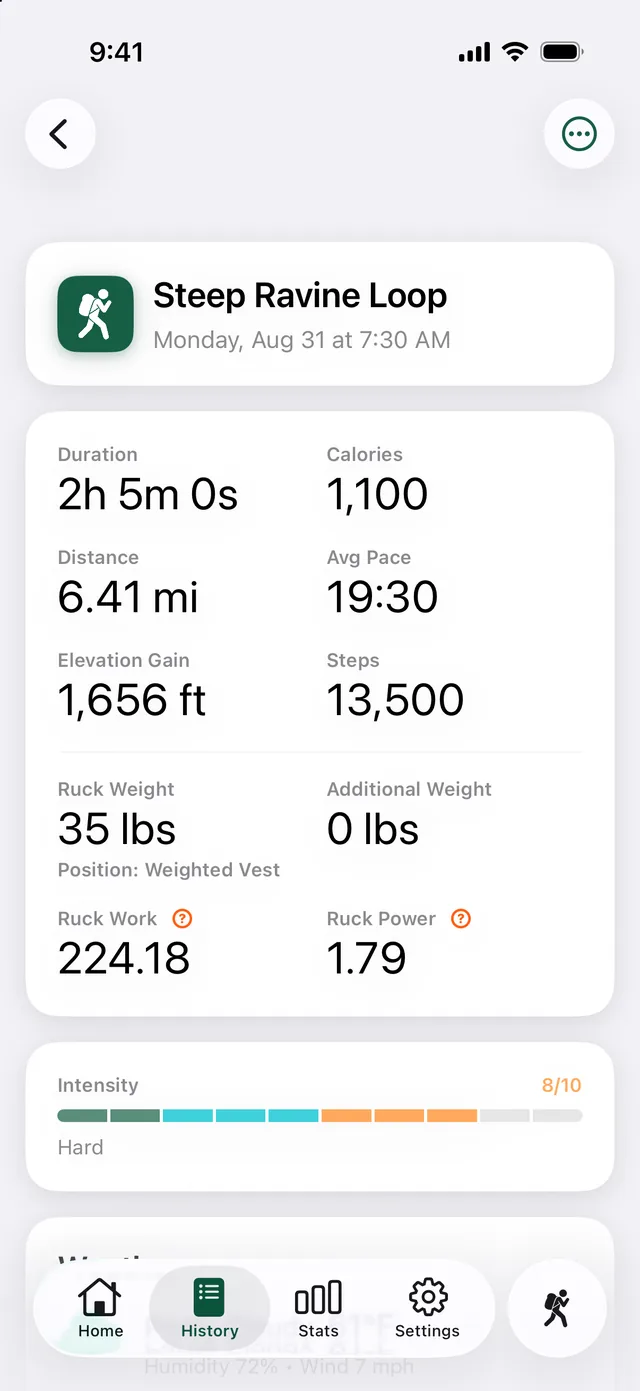
Workout detail for Steep Ravine Loop: 2 hours 5 minutes, 1,100 calories, 6.41 miles, 1,656 feet of elevation gain, 35 pound weighted vest, ruck work 224.18 and ruck power 1.79.

Who it's for

Whatever you're carrying it for.

For everyday walkers

Turn the walk you already take into a workout.

Carrying weight raises the energy cost of every mile. You get more out of the walk you were already going to take. Start with a backpack or a weighted vest, and RuckWell counts the weight in your calories.

How it counts the weight

For people who track everything

Make rucking count in your training data.

The pack becomes ruck work, ruck power and a training load that sits beside your runs and lifts, and your recorded rucks save to Apple Health or Health Connect. On iPhone, Plus adds a morning Recovery Score.

See load and recovery

For hikers and the outdoors

Make the trail your training.

Exercising outdoors is linked to better mood than the same work indoors. Rucking is a good excuse to go. Every route, climb and mile is saved, and with Plus on iPhone you can follow a GPX route.

See your routes and progress

For event and selection prep

Show up to event day ready.

Log every training ruck under load with mile splits, pace and heart rate, and watch your ruck work and ruck power build week by week. RuckLoad™ tells you when it's time to ease off.

See the live screen

What is RuckWell?

RuckWell is a free rucking app for iPhone, Apple Watch and Android. Tell it what you're carrying and the weight becomes part of the numbers that matter: calories, ruck work, ruck power and your training load over time. Then it helps with the other half of training: easy days, mobility and rest. There is no account to create and nothing to sign up for.

Load-adjusted from the first step

Tell it what you carry. Then walk.

Save the packs and vests you use, pick one, and go. Your ruck's energy cost comes from your body weight, your pack, your pace and the ground under your feet. RuckWell counts your pack weight, which many standard walking estimates leave out.

Trails and rough ground make your body work harder than pavement, so set the terrain and the extra work is counted too.

  • Load-adjusted calories on every ruck
  • Ruck work and ruck power: the weight you carried times the distance, and how fast you carried it
  • Pack or vest, plus extra weight like a sandbag or kettlebell
  • Terrain and hills in the calorie count on outdoor rucks
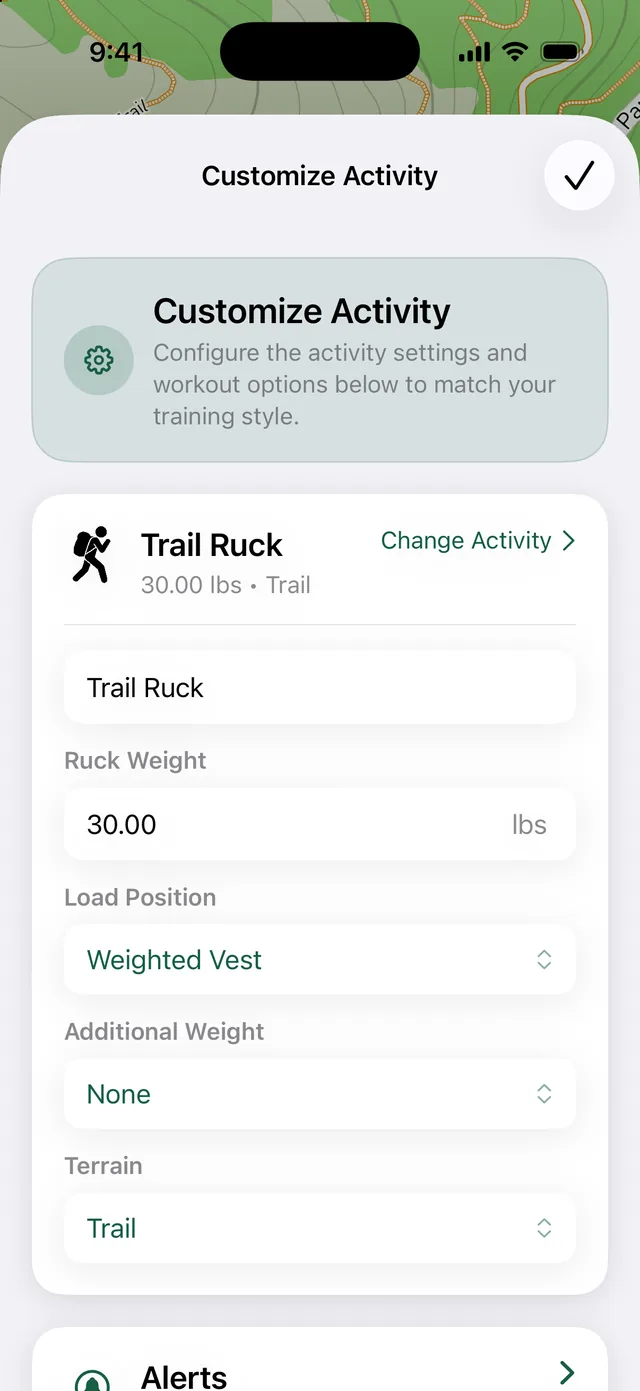
Customize Activity screen for a Trail Ruck: 30 pounds, load position Weighted Vest, terrain Trail.

While you move

Every metric, one glance.

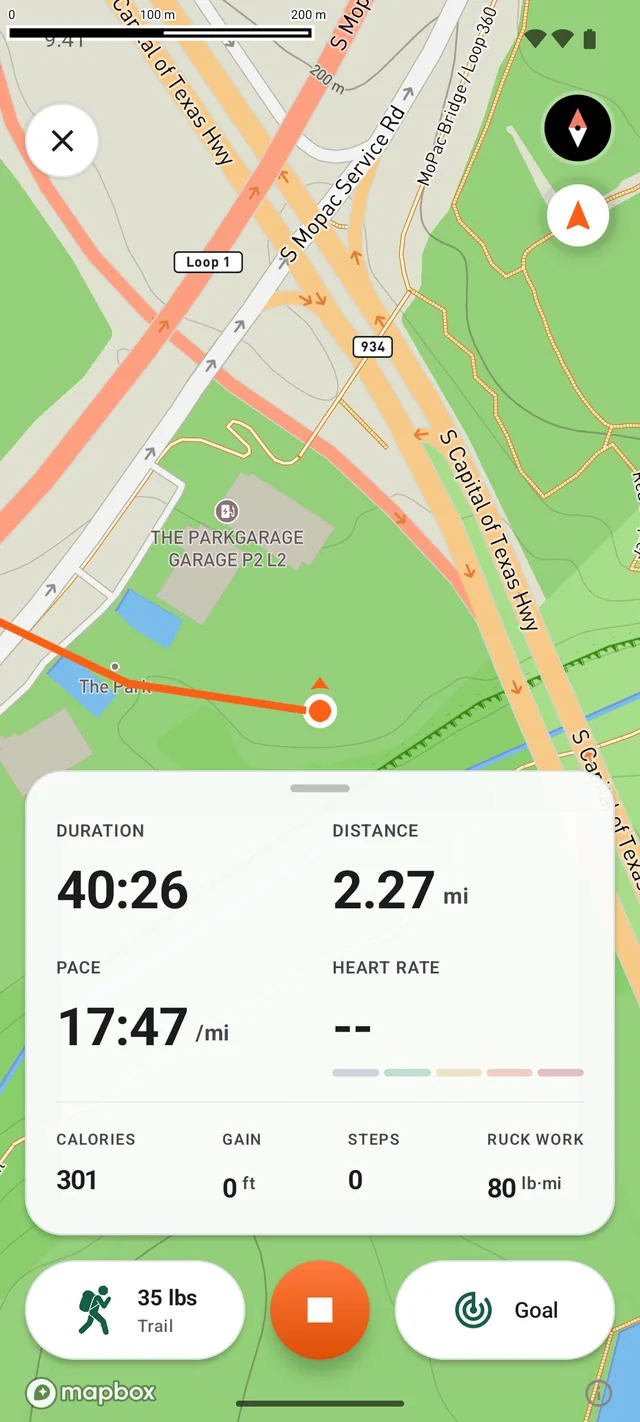
Time, distance, pace, heart rate, calories and ruck work on one screen, with your route behind it. Mile or kilometer splits as you go, and optional auto-pause for traffic lights and dog stops.

Live ruck on RuckWell for Android: 40 minutes 26 seconds, 2.27 miles, pace 17:47 per mile, 35 pound trail ruck, route map behind the numbers.
RuckWell for Android

iPhone and Apple Watch

Leave your phone in the pack.

The Apple Watch app records on its own, with its own GPS and heart rate, and syncs the ruck to your iPhone when you're done.

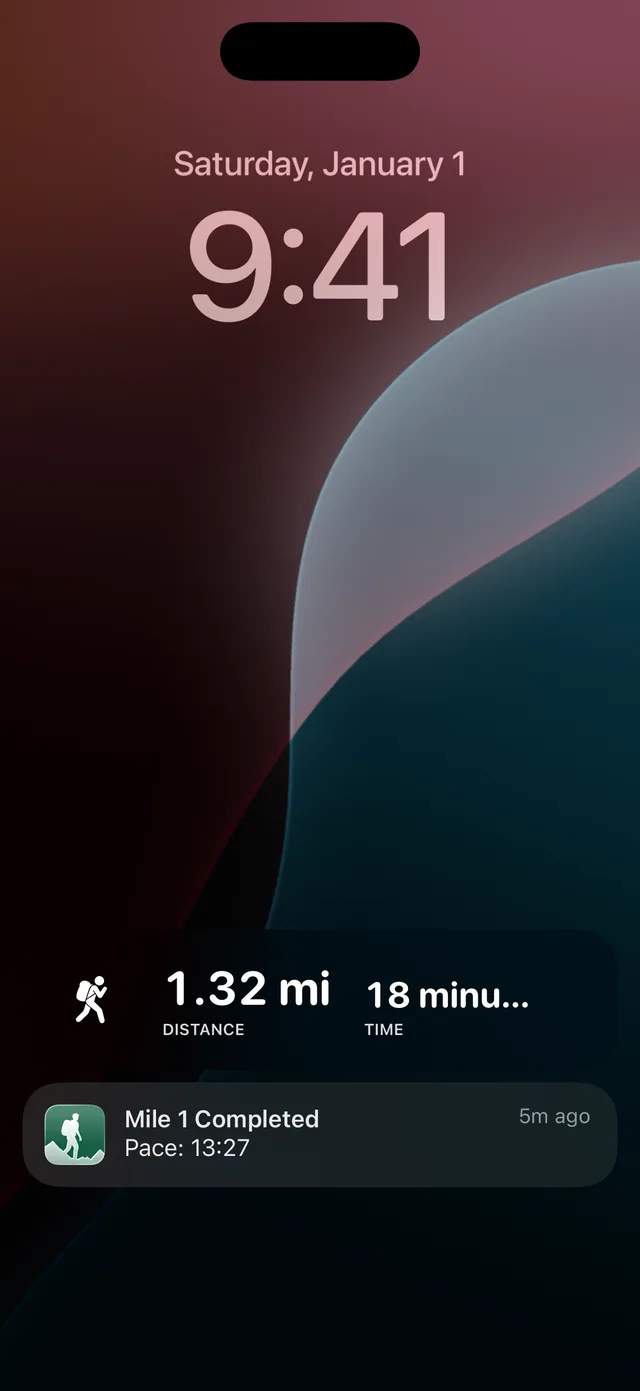
On your phone, a Live Activity keeps time, distance, pace, calories and heart rate on the Lock Screen and in the Dynamic Island, and stays readable on the Always-On display.

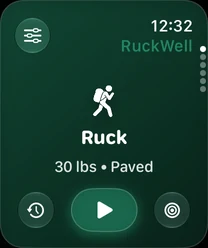
RuckWell on Apple Watch, ready to start a Ruck at 30 pounds on paved ground, with a Start button.
RuckWell on Apple Watch
iPhone Lock Screen with a RuckWell Live Activity at 1.32 miles and 18 minutes, and a Mile 1 Completed notification with pace 13:27.

Recovery, built in

The other half of training.

Your body gets fitter while it recovers, not just while you ruck. Rest days are part of the plan. RuckWell keeps track of both halves, so you can plan the next ruck.

The Today card iPhone

Hard day, easy day or rest day.

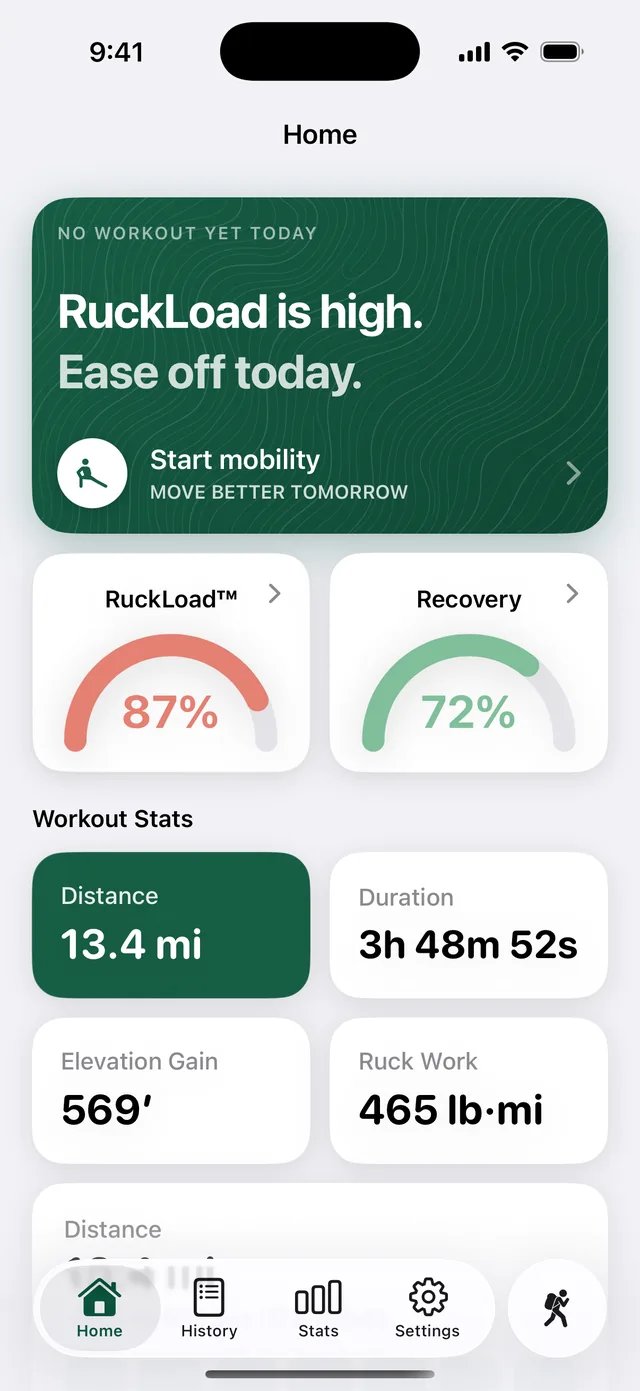
Through the day the Today card reads your RuckLoad™ and what you've already done, then makes the call in plain words. One tap starts the ruck or the mobility session it suggests.

  • “RuckLoad is high. Ease off today.”After two heavy weeks, with a mobility session ready to start
  • “You've put the work in. Now loosen up.”After a ruck
  • “Rest is where it sticks.”Once the day's work is done

Free on iPhone. With RuckWell Plus it also reads your Recovery Score.

RuckWell Home on iPhone: the Today card reads RuckLoad is high. Ease off today. with a Start mobility button, above RuckLoad at 87 percent and Recovery at 72 percent.

RuckLoad™ iPhone and Android

Training load that knows what you carried.

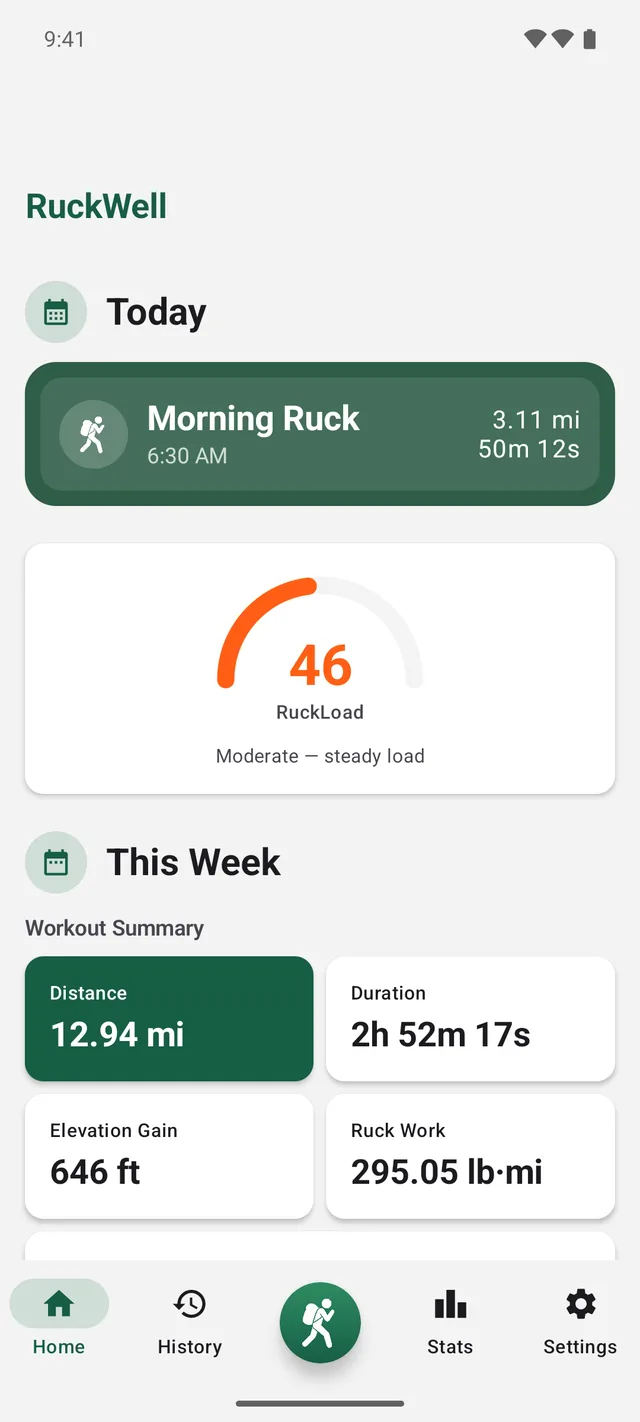
RuckLoad™ rolls your last two weeks of training into one number, and the pack counts: the weight you carried, the climb and how hard you worked. Each morning it shows whether there's room to build or it's time to back off. Free on both apps.

RuckWell Home on Android: this morning's Morning Ruck above a RuckLoad gauge at 46, labelled Moderate, steady load.
RuckWell for Android

Recovery Score Plus iPhone

A morning read on how you've recovered.

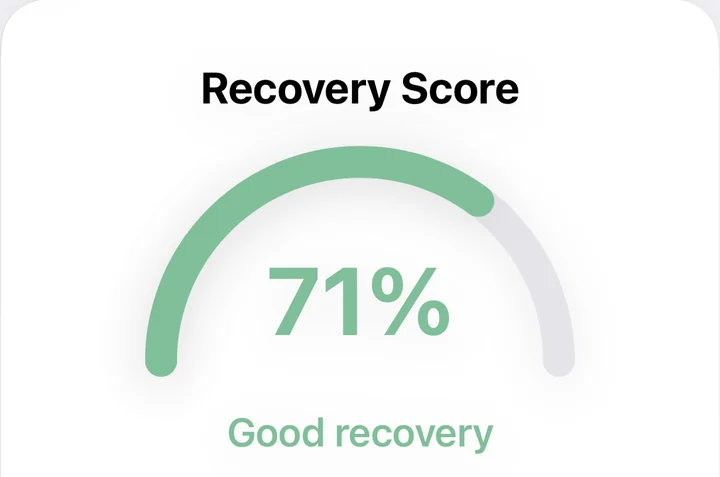
Each morning your heart rate variability, resting heart rate, sleep and breathing rate are compared with your own normal and rolled into one score beside RuckLoad™. Tap through for last night's sleep stages and a week of trends. Use it alongside how you feel, not instead of it.

Recovery Score card from RuckWell on iPhone: a gauge at 71 percent labelled Good recovery.
RuckWell for iPhone, with Plus

Between rucks iPhone and Android

Mobility

Time a mobility session like any workout, with heart rate from Apple Watch or a Bluetooth heart-rate monitor. Stretching regularly can improve your range of motion. A few minutes after a ruck is an easy time to fit it in.

Sauna

Log sauna time with a timer and heart rate. A sauna after a ruck is a relaxing way to wind down. Drink water, keep it comfortable, and check with your doctor first if you have a heart condition.

Cold plunge

Log cold plunges the same way, so the whole routine lives in one place. Timed sessions save to Apple Health or Health Connect with the rest of your training.

Progress

Watch yourself get stronger.

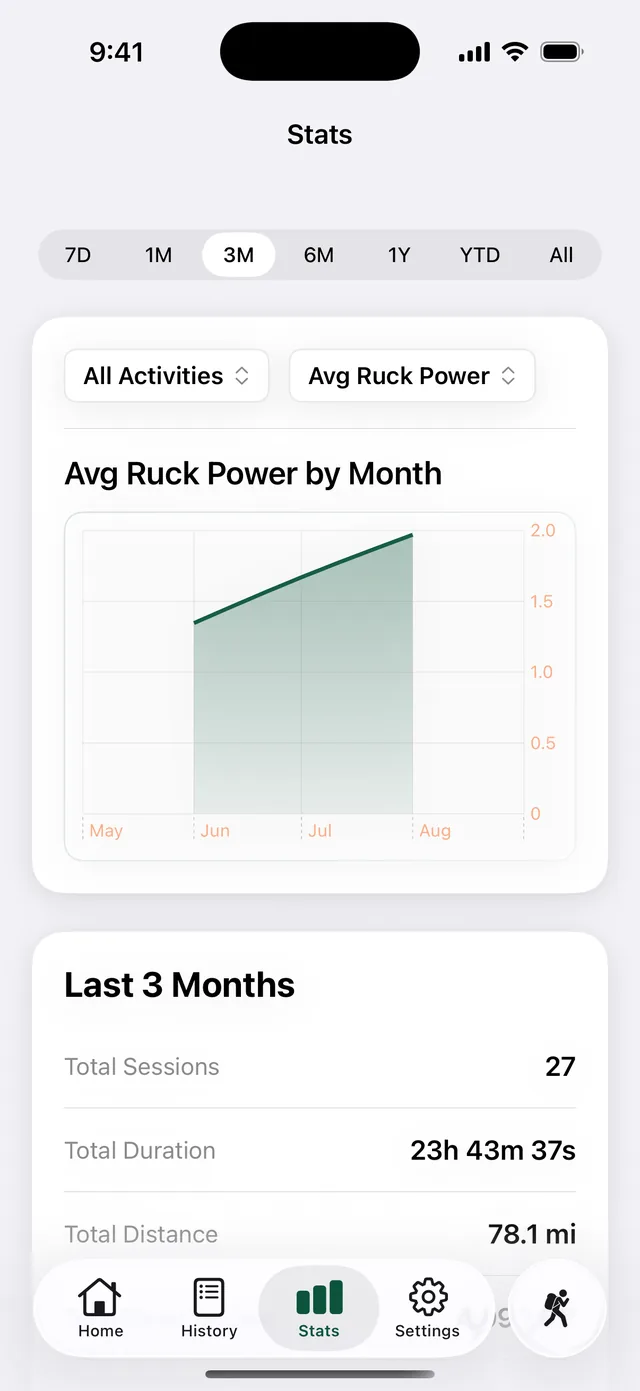
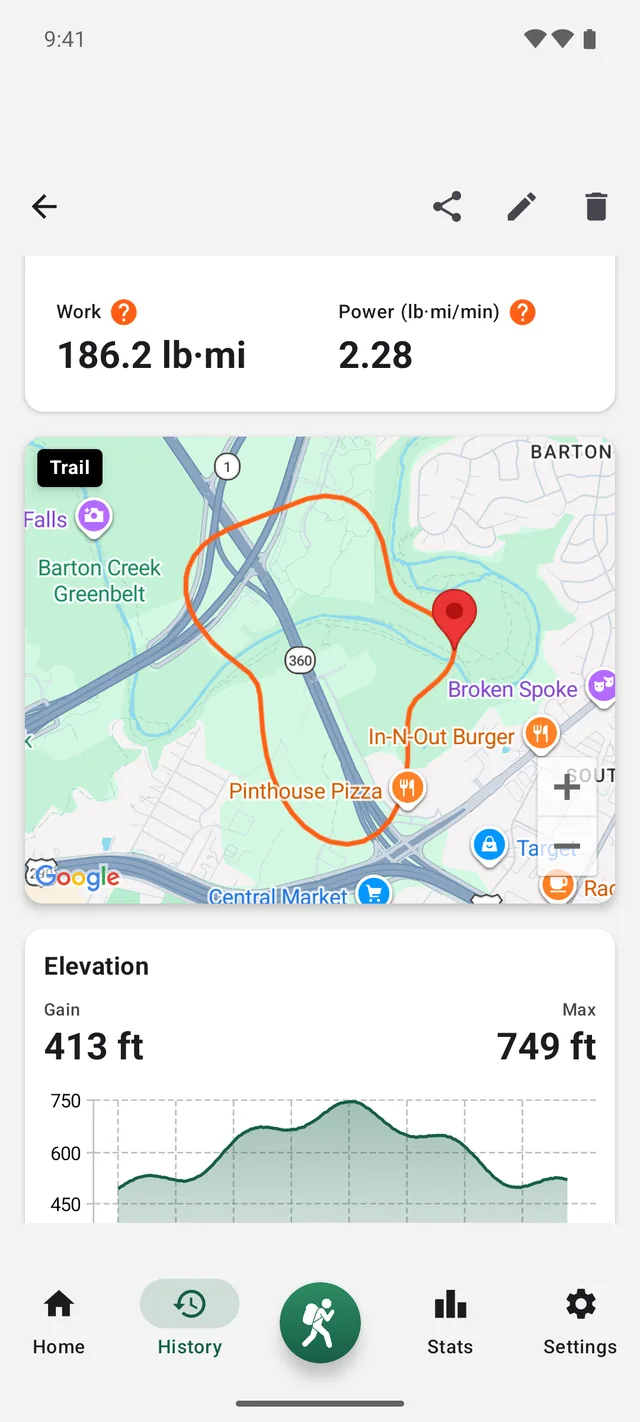
Every ruck keeps its route, climb, splits and heart rate. Stats chart your distance, ruck work and ruck power from the last week to all time, so you can see whether you're moving more weight, faster, month over month. A calendar shows the habit building.

Stats screen charting average ruck power rising from June to August, with 27 sessions, 23 hours 43 minutes and 78.1 miles in the last three months.
Workout detail on RuckWell for Android: ruck work 186.2 pound-miles, ruck power 2.28, a trail route map and an elevation chart with 413 feet of gain.
RuckWell for Android

And the rest of the kit

Built for loaded movement, wherever you do it.

Indoor and treadmill

Set belt speed and incline, up to 40% grade, and the miles land in your history with real numbers. Treadmill controls are on the phone.

Heart rate, your way

Apple Watch or a Bluetooth chest strap. Zones from a standard formula, from Apple Health on iOS 27, or your own thresholds on iPhone.

Alerts that tap you iPhone

Distance, time, pace and heart-rate zone alerts on iPhone: a notification on your phone, a tap on your wrist.

Follow a route Plus iPhone

Import a GPX file and follow it on your phone or Apple Watch, with a haptic tap at each waypoint and an off-course warning.

Strava Plus iPhone

Send rucks to Strava with your route, heart rate and elevation.

Export

FIT and GPX files for any workout on iPhone, and for GPS workouts on Android.

Siri and Spotlight iPhone

Start a saved setup with your voice on iOS 26, and find any ruck from Home Screen search.

Personal bests iPhone

After a few rucks of the same kind, a new farthest, longest or biggest-climb ruck gets called out on your summary.

VO₂ max protection iPhone

Turn it on and outdoor rucks save to Apple Health as Other, so a heavy pack doesn't drag down Apple's VO₂ max estimate.

Works with

  • Apple Watch
  • Apple Health
  • Health Connect
  • Bluetooth heart-rate monitors
  • GPX and FIT
  • Strava Plus iPhone

Private by design

No account. Nothing to sign up for.

RuckWell has no accounts and no servers that hold your workouts. They stay on your phone and in your own Apple Health or Health Connect, and on iPhone they sync between your devices through your private iCloud. Read the privacy policy.

Reviews

People who ruck, in their own words.

Verbatim App Store reviews. 4.5 stars from 938 ratings, November 2026.

Does it count the weight?

5 out of 5 stars

Perfect

Best app I have found for ruck. I recently got a vest and realized the normal walk wasn’t correct. This app kills it.

keentwo2 · Sep 2025

5 out of 5 stars

Rucking Perfect

Just what I was looking for, compensates for Apple not having Rucking as an activity. Ability to add your ruck weight seems to be much more predictive of the work achieved. Highly recommended.

Sailor.Ed · May 2025

5 out of 5 stars

If you ruck. This is your app.

If you ruck and want to actually track your calories properly, get this app. 5 stars. Well earned. …

user4225 · Jun 2025

Is it simple?

5 out of 5 stars

So simple. So effective.

Super easy to use. Downloaded and figured out how to track a ruck before I finished stretching. I really like reviewing my stats every so often.

Below Sea Level · Sep 2025

5 out of 5 stars

Perfect for my needs

A well constructed app with a great interface. Gives me the information and stats that I need without overwhelming me. Does what it says on the tin!

iain1968 · Mar 2026

5 out of 5 stars

Awesome Simple App

Such a great app and I’m so grateful to have an app that recognizes the value of rucking. The interface is simple but so easy to use which I love.

Navychick101 · Jul 2025

Does it work with Apple Watch?

5 out of 5 stars

Excellent app

This application accurately captures your workout for Rucking, synch from your watch to your phone, integrates with the health app and is easy to use. A must have if you ruck.

Gordo 2003 · Nov 2025

5 out of 5 stars

Versatile

… You are able to connect your Apple Watch if you have one. App totally function with bare bone usage. 100% worth downloading. I never write reviews but this app deserves the credit.

PHRN Mark · Jul 2026

Is it really free?

5 out of 5 stars

Barebones but exactly what ya need

… It’s a no frills app but has a clean, easy to navigate interface with plenty of options to customize your workouts. And for free? This app has more functionality than some paid options. 10/10 recommend

whoismisteranderson · Jul 2025

5 out of 5 stars

Awesome!

I don’t do these reviews but I had to on this one just to let people know it’s just a straight forward app no ads popping up or “watch this video” stuff. …

AustinG95 · Jul 2025

Read all reviews on the App Store

Why ruck

A harder walk, gentler steps.

More from the same walk

Carrying weight raises the energy cost of every mile. You get more out of the walk you were already going to take.

Harder work for heart and lungs

A pack makes your heart and lungs work harder, and each step lands far more gently than a running stride.

Time outside counts

Exercising outdoors is linked to better mood than the same work indoors. Rucking is a good excuse to go.

An effort you can repeat

Rucking at a pace where you can still hold a conversation builds aerobic fitness, especially when you're starting out. It's an effort you can come back to again and again.

For general fitness and informational purposes; not medical advice. Consult a professional before starting a new exercise program.

Free vs RuckWell Plus

Free does the real work. Plus goes deeper.

Plus is in the iPhone app today. Android has the free app.

What is included in RuckWell Free and RuckWell Plus
FeatureFreePlus
Rucking
GPS distance, pace, splits and auto-pauseIncludedIncluded
Load-adjusted calories, ruck work and ruck powerIncludedIncluded
Terrain and elevation gainIncludedIncluded
Heart rate from Apple Watch or a Bluetooth strapIncludedIncluded
Apple Watch app and Live Activity (iPhone)IncludedIncluded
Indoor and treadmill rucksIncludedIncluded
Full history, calendar and trendsIncludedIncluded
Apple Health and Health Connect syncIncludedIncluded
FIT and GPX exportIncludedIncluded
Recovery and wellness
RuckLoad™ training load, counting the weight you carriedIncludedIncluded
Today card: hard day, easy day or rest day (iPhone)IncludedIncluded
Mobility, sauna and cold plunge timersIncludedIncluded
VO₂ max protection for Apple Health (iPhone)IncludedIncluded
Recovery Score each morning, with sleep, HRV and resting heart rate detailNot includedIncluded
Today guidance that factors in your Recovery ScoreNot includedIncluded
Nutrition card, read from your food-logging app in Apple HealthNot includedIncluded
Going deeper
Heart-rate zone breakdowns, per workout and per weekNot includedIncluded
Pace, grade-adjusted pace and cadence chartsNot includedIncluded
GPX route import and navigationNot includedIncluded
Spoken audio cuesNot includedIncluded
Strava uploadNot includedIncluded

RuckWell Plus

$4.99

a month, or $49.99 a year

Subscribe in the app on iPhone. US prices, November 2026.

Everything in Free stays free.

FAQ

Questions, answered.

What is rucking?

Walking with weight on your back: a rucksack, a weighted vest or a loaded backpacking pack. It makes a walk harder work, and each step lands more gently than a running stride.

Is RuckWell free?

Yes. Tracking, load-adjusted calories, RuckLoad™, the Today card, mobility, sauna and cold plunge timers, heart rate, the Apple Watch app and your full history are free. RuckWell Plus adds the morning Recovery Score, route navigation, spoken cues, Strava upload and deeper analytics for $4.99 a month or $49.99 a year, in the app on iPhone.

Does it work with a weighted vest?

Yes. Log the walk as a ruck and enter the vest weight, and RuckWell counts it in your calories, ruck work and ruck power. Save the vest as a setup and pick it before each workout.

Does RuckWell help with recovery?

Yes. RuckLoad™ shows how hard your last two weeks have been, counting the weight you carried, on iPhone and Android. On iPhone the Today card suggests a ruck, mobility or a rest day, and RuckWell Plus adds a morning Recovery Score from your heart rate variability, resting heart rate and sleep.

Can I log mobility, sauna or cold plunge?

Yes, on iPhone and Android. Time them like any workout, with heart rate from Apple Watch or a Bluetooth heart-rate monitor. Timed sessions save to Apple Health or Health Connect.

Do I need an account?

No. There is nothing to sign up for. Your workouts stay on your device, in Apple Health or Health Connect, and on iPhone in your own iCloud.

Does it work with Apple Watch?

Yes. The Apple Watch app records on its own with its own GPS, with or without your phone nearby, and syncs the ruck to your iPhone. It needs the iPhone app installed.

What's different on Android?

Both apps track rucks with GPS, count the weight in your calories and RuckLoad™, and keep your history. Mobility, sauna and cold plunge timers are on both. The Apple Watch app, Live Activity, the Today card, personal bests, workout alerts, custom heart-rate zones and RuckWell Plus with its Recovery Score are on iPhone today.

Does it work on a treadmill?

Yes. Set belt speed and incline in the app, up to 40% grade, and distance and pace come from the belt. Treadmill controls are on the phone.

Does it sync to Strava?

With RuckWell Plus on iPhone, rucks upload to Strava as hikes with your route, heart rate and elevation.

What do I need to run it?

iPhone on iOS 18 or later; the Apple Watch app needs watchOS 10.4 or later. Android 10 or later, with Health Connect to sync with other health apps. A Bluetooth heart-rate monitor is optional.

Still stuck? Email support@ruckwell.com.

Ruck. Rest. Repeat.

Free on iPhone, Apple Watch and Android.

Also on Google Play. Also on the App Store for iPhone.

QR code that opens RuckWell in the App Store or Google Play

Scan to get the app

See you out there.